Application Banks
- Dual application flash banks, Bank A and Bank B.
- Provides a redundancy mechanism used by the bootloader's update mechanisms.
The SLN-VIZN3D-IOT utilizes a series of dual "application flash banks" used as redundancy mechanism when updating the firmware via one of the bootloader's update mechanisms.
Addresses
The flash address for each of the application flash banks are as follows:
- Bank A -
0x30100000 - Bank B -
0x30780000
Configuring Flash Bank in MCUXpresso IDE
Configuring the flash bank can be done in MCUXpresso IDE before compiling a project.
- Right-click the
sln_vizn3d_iot_smart_lockproject in the Project Explorer window. - Go to Properties
- Click on MCU Settings
- Change
FLASH_BANKfrom0x30100000to0x30780000or vice versa. - Build the project
Convert .axf to .bin
When building a project in MCUXpresso IDE,
the default behavior is to create a .axf file.
However, some of the bootloader update mechanisms including MSD updates require the use of a .bin file.
Fortunately,
converting a .axf file to .bin can be done in MCUXpresso without any additional setup.
To perform this conversion, navigate to the project directory which contains your compiled project binary and right-click on the .axf file in that directory.
info
The binary for your project is likely located in either the Debug or Release folder depending on your current build config.
In the context menu, select Binary Utilities->Create binary.
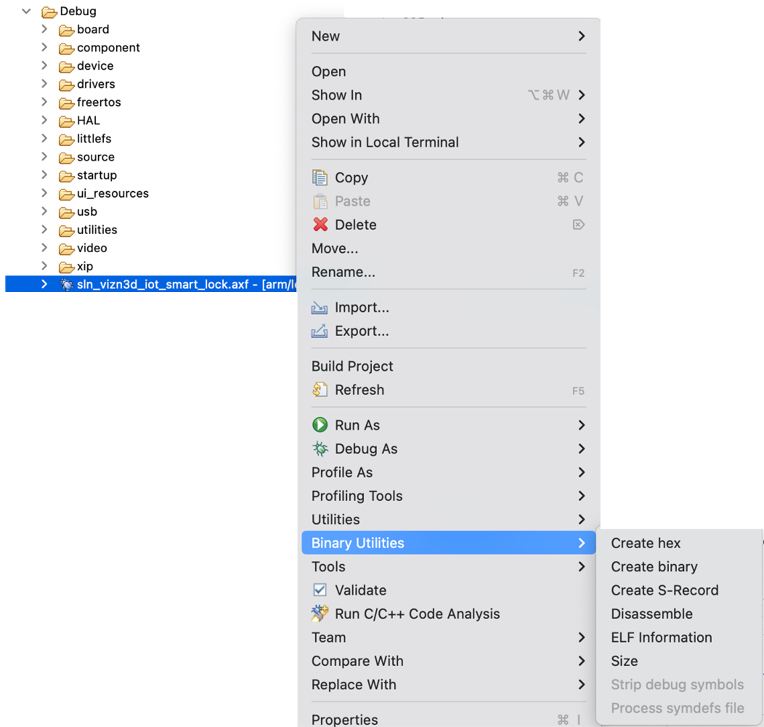
Verify that the binary has successfully been created.